Search This Blog

Showing posts with label Cloud. Show all posts

List GCS files in 3 steps using Python program


1) We should install google-cloud-storage package to access Google Cloud storage in our Python program. 

Just run the following pip install command to install google-cloud-storage

  pip install google-cloud-storage


2) The first thing to do to access GCS from your Python program is authentication. 

We'll create a credentials JSON file and use it for authentication. 

You can generate your own credentials JSON file using this link


Generate credentials JSON file

You can also follow this link to generate JSON file.

http://www.hadooplessons.info/2023/03/simple-way-to-generate-json-key-for.html


3)

Here are the crucial steps to write a Python program for accessing GCS:


create a client 

client = storage.Client()

get access to the existing bucket in GCS

bucket = client.get_bucket(bucket_name)

create file in the gcs bucket and write data into it.

blob = bucket.blob(file_name)

blob.upload_from_string(text)


The full code is given below.


from google.cloud import storage

import os

#from google.oauth2 import service_account

os.environ["GOOGLE_APPLICATION_CREDENTIALS"] = "application_default_credentials.json"

#credentials=service_account.Credentials.from_service_account_file('./application_default_credentials.json')

def list_gcs_blobs(project_id,bucket_id):

    client = storage.Client(project=project_id)

    blobs=client.list_blobs(bucket_id)

    return blobs


project_id='startbig'

bucket_id='pubtest1'


blobs=list_gcs_blobs(project_id,bucket_id=bucket_id)

for blob in blobs:

    print('blob name is',blob)


Modify project_id,bucket_id and run the program. Please note you need to keep credentials JSON file in the same directory this program is written otherwise change the path in os.environ line.

Top 10 key differences between Java and Python

 Top two programming languages used in the software industry are Python and Java.Python tops the list and Java is close to Python.

Are you curious about questions such as which programming language, Java or Python, is faster? 

Wondering which language is superior for web development or overall usage? This article delves into the 10 crucial distinctions that every Java and Python developer should be aware of.


1.


Java is a compiled language. Entire Java code is converted into bytecode before it is run on a machine. This makes Java faster.

Whereas Python is an interpreted language, Python translates one line after another while is being run on the machine. this makes Python slower


2.


Java is a static-typed language. Every variable requires a datatype to be defined in Java and every method should have a return type.

Unlike Java, Python is a dynamically typed language. Python does not need a datatype for a variable and does not need a return type for a function.


3.


Java supports multiple inheritance partially through Interfaces. Python supports multiple inheritance fully. Python addresses the diamond problem using method resolution order.


4.


Java has several options for web development. Many frameworks like Spring support web development in Java. 

Python has fewer options for web development. Tools like FLASK and Django provide web development in Python.


5.


Python has advanced tools like Pandas and numpy for data analysis. data analysis tools in Java are not as popular as pandas and numpy.


6.


Java is the best option for database integration. Java has many ORM tools like hibernate and also Java supports enterprise applications.

Python has ORM tools like SQLAlchemy not many enterprise applications use Python.


7.


As discussed, Java is a static-typed language. Rapid prototyping and rapid development is difficult in Java. In Python prototyping and development tasks are faster.


8.


Java is fast and Python is slow. Python is an interpreted language and it translates code line after line. Python is slow because of that.

9.


Java is relatively less known for Artificial intelligence and Machine Learning applications. Python community has a rich library for artificial intelligence and machine learning applications.

10.


Java is well for mobile development. Whereas Python is not well-known for mobile development.

These are the top 10 differences between Java and Python. Let me know if you know of any more differences.


Simple way to generate JSON key for google service account

 Cloud technologies became one of the important skill sets in the job market nowadays. It could be Google Cloud, Microsoft Azure, or Amazon cloud technologies. In this article, we will learn the easy way to generate JSON key files for a Google service account. 

1. Go to service accounts under IAM & Admin menu

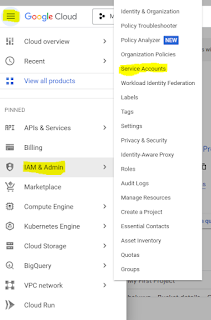
After opening Google Cloud Console, Click on the 3 horizontal lines next to Google Cloud in the top left corner, Later click on the IAM and Admin menu from there go to service accounts and click on it.
Select relevant Google cloud project if already not done.

locate service accounts options under Iam and admin menu in the google cloud
Locate service accounts under IAM & Admin

2.  Create a new service account

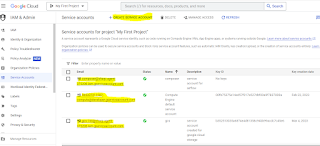
From here, We have two options for generating JSON files for service accounts.  We can generate JSON files for existing service accounts or We can create a service account and generate JSON key file for that. We will see both options in this article. First We will create a service account and then go to JSON key file generation.

in the middle of the page, We will see Create service account option, click on that.

Create a service account under IAM and Admin in the google cloud


3.  Enter Service account details

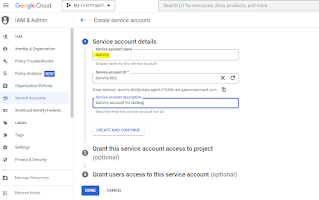
Enter a name for the service account, and the service ID is auto-generated. You can enter some text as a description for the service account.
Service account name, ID, and Description in the google cloud

for example, This service account is used for Airflow. 

4. Choose Roles for the Service account

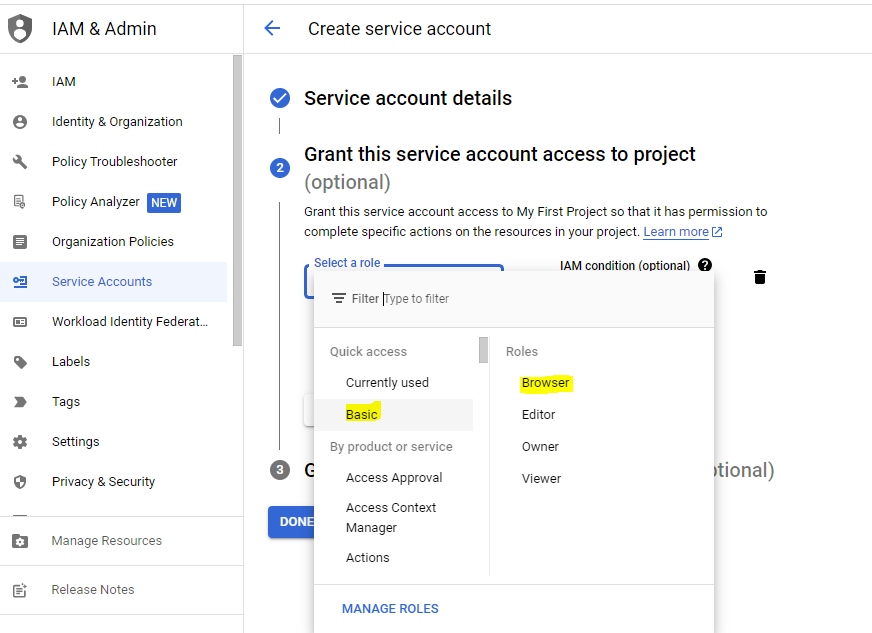
In the second step, you can also select some roles for the gcloud service account. for example, we have selected a browser role for our service account dummy.


Now click on done, and a service account called dummy is created for you. We have several other options while creating a service account, we will cover them in another article.

5. JSON key generation

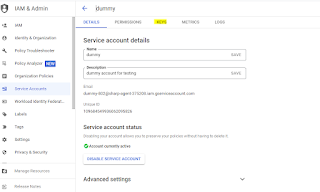
Now Go to the service account you just created and click on the keys menu and also click on the add key option. 

Keys for the service accountin google cloud

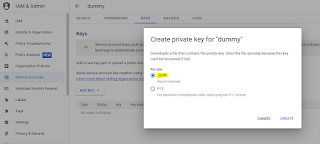
From there choose to create a new key option.

JSON option is auto-selected and we just need to click on the create option. 
JSON file is created and auto-downloaded to the local downloads folder.

Json key generation for a service account in the Google Cloud

This JSON file is used in several places for authentication. for example, you can use this JSON file in Tableau software to authenticate and also we can use this JSON file in the Python program to authenticate to google cloud services.

Let me know if you have any queries. You can also check this video  for the same help.